How to See an Instagram Profile Picture in Full Size (HD DP Viewer)
Instagram shows profile pictures as a tiny circle with no zoom. See any profile picture in full size, even on private accounts, and save it in HD.
To see an Instagram profile picture in full size, type the username into a DP viewer like Klupt’s free Instagram profile picture viewer. It loads the largest version Instagram stores, so you see the whole photo instead of a tiny circle. Instagram itself has no zoom for profile pictures, which is why a zoomed-in screenshot comes out blurry.
Maybe it’s a new match and you want to see their face properly. Maybe your crush just changed their profile picture, or an old friend popped up in your suggestions and you can’t tell if it’s really them. Whatever the reason, the little circle doesn’t show you much.
The short answer
- Instagram has no zoom. The app shows profile pictures as a small circle (110 x 110 pixels).
- A DP viewer shows the biggest version. Klupt’s profile picture viewer is free, has no daily limit and needs no login.
- Private accounts work too. Every Instagram profile picture is public, even when the account is private.
- Nobody is notified. Instagram doesn’t tell people when you view or save their profile picture.
- Be kind with it. Looking is fine. Reusing someone’s photo as your own is not.
Why can’t you zoom in on an Instagram profile picture?
Instagram shows profile pictures as a small circle and doesn’t offer any zoom or full-screen view. In the app the picture is displayed at 110 x 110 pixels, and pinching it does nothing.
Tapping the picture doesn’t help either. If the person has no active Story, you don’t get a bigger photo. If they do have one, you’ll see a colored ring around the circle, and tapping it opens their Story.
That second part matters. Story viewers are visible to the owner for 48 hours, so one curious tap can put your name on their viewer list. If you’re trying to look quietly, don’t tap a picture with a ring around it.
On some screens, pressing and holding a profile picture pops up a slightly bigger preview. It’s still small, still a circle, and you can’t zoom into it.
The good news: Instagram keeps a bigger copy of every profile picture than the circle it shows you. You just need a way to load that copy.
How to see an Instagram profile picture in full size: 3 ways compared
There are three common ways to see an Instagram profile picture bigger: screenshot and crop, open the profile on the web, or use a DP viewer. Only a DP viewer loads the larger stored version, so it’s the only one that gives you a clear photo.
| Method | What you get | Quality | Works on private accounts | Notifies them |
|---|---|---|---|---|
| Screenshot + crop | The tiny circle, cut out of your screen | Blurry as soon as you zoom | Yes | No |
| Open on instagram.com | A slightly bigger circle, still no zoom | Small | Yes | No |
| DP viewer (like Klupt) | The whole photo, in the largest size Instagram stores | Best available | Yes | No |
Screenshot and crop
This is what most people try first. You take a screenshot of the profile, crop around the circle, and zoom in with your photo app.
The problem is simple: you’re zooming into a picture that was only ever shown as a tiny circle. Faces turn into soft blobs, and the corners of the photo are cut off by the circle. It’s fine to check a color or a vibe, not to recognize someone.
Open the profile on the web
On a computer, you can open instagram.com and go to the profile. The circle is a little bigger on a desktop screen, but there is still no zoom and no full-size view. Some people try to open the image in a new tab, which usually gives you the same small file. And if the picture has a Story ring, clicking it opens their Story.
Use a DP viewer
A DP (display picture) viewer asks Instagram for the largest version of the profile picture it has, then shows it as a normal photo. You see the full square image, not a cropped circle, and you can zoom and save it. It’s the only method of the three that gets you more detail.
How to use Klupt’s Instagram profile picture viewer
Klupt’s Instagram profile picture viewer shows the largest version of any account’s profile picture. You type a username, and you can zoom in or download the photo in HD. It’s free, has no daily limit and never asks for your Instagram login.
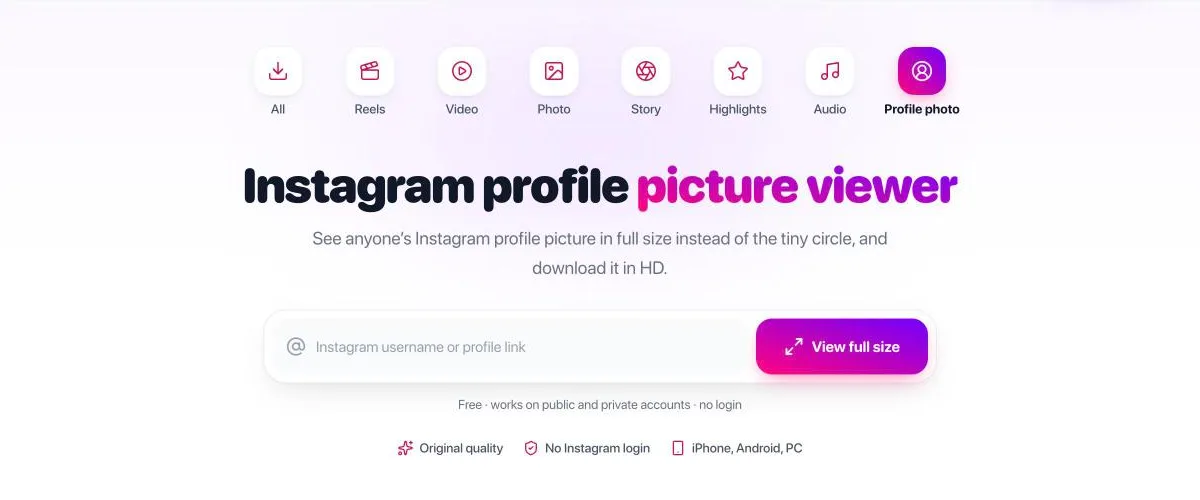
- Open the Instagram profile picture viewer on your phone or computer.
- Type the Instagram username, with or without the @, or paste the profile link.
- Klupt loads the largest version of their profile picture that Instagram stores.
- Tap the photo to zoom in and see the details.
- Tap Download HD photo to save it as a JPG.
You don’t need an Instagram account, and the person isn’t notified. It works the same on public and private accounts, because profile pictures are public on both.
Want to see their profile picture clearly? Type any username and get the full-size photo in a few seconds. Open the free Instagram DP viewer No login, no daily limit.
Can you download an Instagram profile picture in HD or 1080p?
Yes, you can download the largest version of an Instagram profile picture that Instagram stores, and Klupt saves it as a JPG. How big that file is depends on the photo the person uploaded, so no honest tool can promise 1080p for every account.
Here’s why. If someone uploaded a sharp, high-resolution photo, the stored version is much bigger and clearer than the circle in the app. If they uploaded a small or blurry picture, the stored version is small or blurry too. A downloader can’t add detail that was never there.
So when a site says “1080p profile picture downloader”, read it as “the biggest version available”. That’s still a huge step up from a screenshot, and it’s what you want for zooming in or checking a photo.
What size is an Instagram profile picture?
Instagram displays profile pictures at 110 x 110 pixels in the app, cropped to a circle. The usual advice for your own photo is to upload at least 320 x 320 pixels, so it stays sharp. Keep your face near the center, because the corners get cut off by the circle.
Can you see a private Instagram account’s profile picture?
Yes. Instagram profile pictures are public on every account, including private ones, so you can see a private account’s profile picture in full size without following them. Instagram keeps the photo, name, bio and follower counts visible to everyone.
What stays hidden on a private account is everything else: posts, Stories, Highlights and the follower and following lists. A DP viewer can show the profile picture, but no website or app can show a private account’s posts. Sites that promise otherwise usually want your login, a payment or an app install. We explain why in how to view a private Instagram account.
Does Instagram notify someone when you view or save their profile picture?
No. Instagram doesn’t notify anyone when you view their profile picture, save it or screenshot their profile. There is also no list of who viewed a profile, so they can’t find out later either.
The one thing to watch is the Story ring. Tapping a profile picture that has an active Story opens the Story, and the owner can see you in their viewer list for 48 hours. Klupt’s DP viewer only loads the picture and never opens Stories, so this can’t happen there.
Apps that promise to show “who viewed your profile picture” can’t get that data, because Instagram doesn’t share it. See who viewed my Instagram profile for what Instagram actually shows you.
Is that profile picture real? How to spot a fake account
A full-size profile picture is the best way to check if an account is fake, because you can run it through a reverse image search. If the same photo shows up under a different name, a model’s page or a stock photo site, you’re probably looking at a catfish.
This is worth doing before you get too invested. A new match, a stranger in your DMs, or an account that suddenly follows your partner: a two-minute check can save you a lot of confusion.
- Save the profile picture in full size with the DP viewer.
- Open a reverse image search such as Google Lens, Bing Visual Search or TinEye.
- Upload the photo and look at the matches.
- Check if the same face appears under other names, on modeling or stock photo sites, or on old accounts.
A full, uncropped photo usually gives the search more to work with than a blurry circle from a screenshot. No match doesn’t prove the account is real, but a match under a different name is a strong red flag.
Other signs of a fake account: very few posts, all uploaded on the same day, a follower count that doesn’t fit the “person”, and no tagged photos from friends.
Is it okay to save someone’s profile picture?
Looking at or saving a profile picture for yourself is normal, but reusing someone’s photo is not. Don’t post it, don’t use it as your own picture, and don’t make accounts with it. That’s how catfishing starts, and it can hurt real people.
If you want to keep a photo of a friend or family member, it’s always nicer to ask. And if you’re checking an ex’s new picture at 2 a.m., that’s human. Just leave it at looking.
Are Instagram DP viewer apps safe?
A DP viewer is safe when it runs in your browser and never asks for your Instagram password. Profile pictures are public, so a real viewer has no reason to need your login.
Leave any site that asks you to “verify” with your password, install an APK, or complete a survey first. Those are the usual signs of a scam. Klupt works in your browser, needs no Instagram login and doesn’t make you install anything. For a longer checklist, read are Instagram profile viewer apps safe.
What else can you see without following them?
Besides the profile picture, Klupt lets you look at a public Instagram profile and see who that account has been following lately, without logging in. The person is never notified.
- Profile: the Instagram profile viewer lets you browse a public profile anonymously, without an Instagram account.
- Recent follows: the recently followed tracker shows who a public account followed lately, newest first, with a girls/guys breakdown. Instagram doesn’t share follow dates, so Klupt shows the order, not exact dates.
- Alerts: add @kluptbot on Telegram and get a message when a tracked profile follows someone new.
If you’d like to browse without an account in general, our guide to viewing Instagram without an account covers what works and what doesn’t.
Want to see who they’ve been following lately? Type their username and get their recent follows, newest first. See who they recently followed on Instagram Your first check is free.
FAQ
How do I see an Instagram profile picture in full size?
Type the username into a DP viewer such as Klupt’s free Instagram profile picture viewer. It loads the largest version of the photo that Instagram stores, and you can tap it to zoom or download it. Instagram itself only shows a small circle with no zoom.
Can I see the profile picture of a private Instagram account?
Yes. Instagram profile pictures are public on every account, private ones included, so you can view one in full size without following the person. Their posts, Stories and follower lists stay hidden.
Does Instagram notify someone when you view or save their profile picture?
No. Instagram doesn’t tell anyone who viewed their profile or profile picture, and it doesn’t notify them when you save or screenshot it. Just don’t tap a picture with a colored ring, because that opens their Story and adds you to the viewer list.
Can I download an Instagram profile picture in HD or 1080p?
You can download the largest version Instagram stores, which is far sharper than a screenshot. The exact size depends on the photo the person uploaded, so no tool can promise 1080p for every account.
What size is an Instagram profile picture?
Instagram displays profile pictures at 110 x 110 pixels in the app, cropped to a circle. The usual advice is to upload at least 320 x 320 pixels. Instagram keeps a bigger copy than the circle you see.
Can you zoom in on a profile picture in the Instagram app?
No. Instagram has no zoom for profile pictures. On some screens, pressing and holding shows a slightly bigger preview, but it is still small. To see it clearly, use a profile picture viewer.