See who unfollowed you on Instagram
Katch Unfollowers is a free Instagram unfollowers extension for Chrome. It shows who doesn’t follow you back on the first scan, then everyone who unfollows you, with dates, checked automatically every day. No password, no sign-up, and your lists never leave your computer.
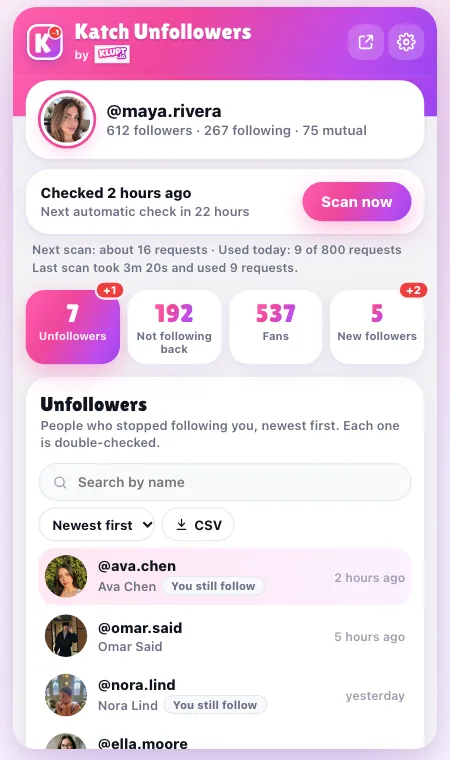
Every list Instagram won’t give you
Instagram has no unfollowers list and no “doesn’t follow me back” button. Katch Unfollowers builds both from your own account.
Who unfollowed me
A dated history of everyone who stops following you, newest first. Each one is double-checked before it shows up.
Not following back
Everyone you follow who doesn’t follow you, on the very first scan. Star friends and brands to keep them off the list.
Fans
People who follow you that you don’t follow back, so nobody slips through.
New followers
Who started following you since your first scan, newest first, plus people who followed you again.
Daily check + alerts
A gentle automatic check once a day while Instagram is open in Chrome, with a notification when someone unfollows you.
Search, sort, CSV
Search by name, hide verified accounts, sort by most recent or A–Z, and export any list to Excel or Google Sheets.
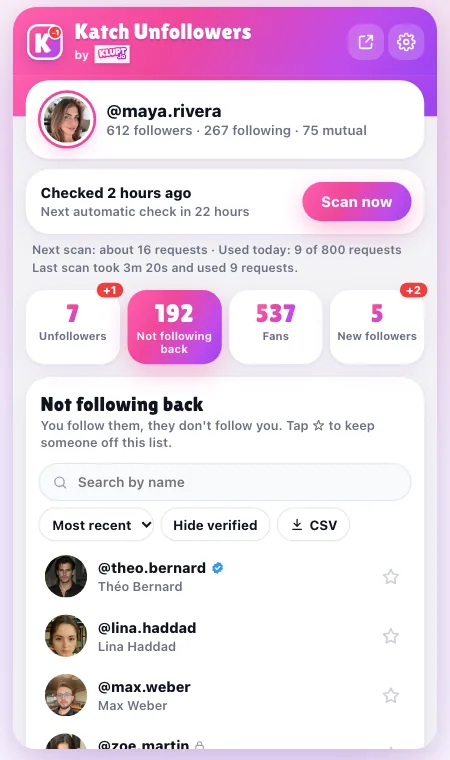
Who doesn’t follow you back?
You don’t have to wait for anything: the first scan lists every account you follow that doesn’t follow you back, newest follows first. Tap ☆ to keep friends, creators and brands off the list, hide verified accounts in one click, and export the rest to CSV before you clean up your following.
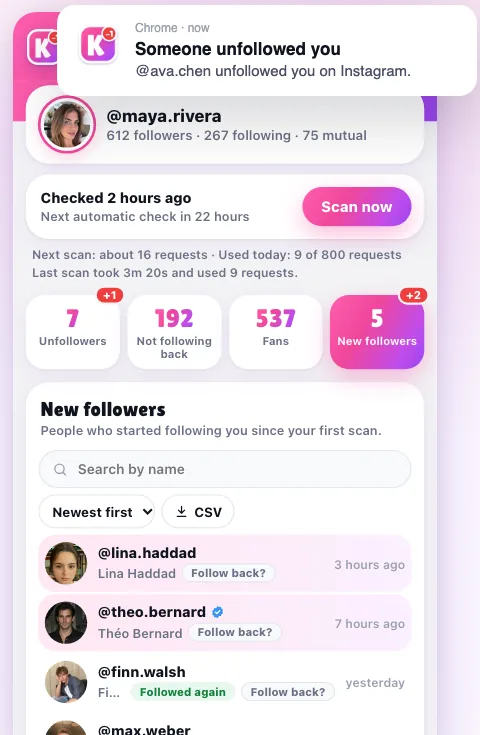
Unfollows are different: Instagram keeps no history of them, so tracking starts with your first scan. From then on, the extension re-checks once a day while Instagram is open in Chrome and sends a Chrome notification when someone unfollows you.
Get notified when someone unfollows you
- Automatic check every day (or every 12 hours, or off) while Instagram is open
- A toolbar badge and a notification for each new unfollower
- New followers and people who followed you again, in their own tab
- Works with several Instagram accounts on one computer
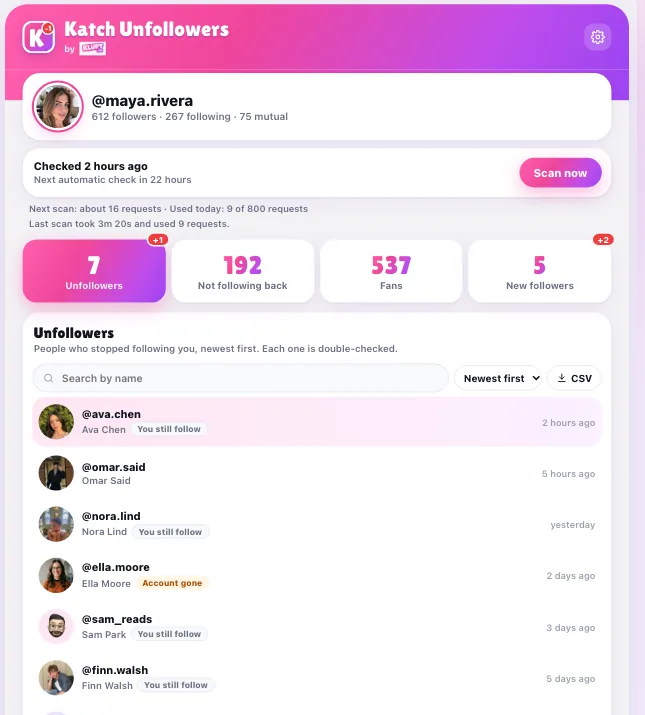
No fake unfollowers. Ever.
The top complaint about unfollower apps is friends showing up as “unfollowed you” when they never left. That happens when an app compares two lists and reports anyone missing, even if Instagram simply skipped them or the account was deactivated. Katch Unfollowers works differently:
- If Instagram doesn’t send your whole list, nothing is compared at all
- Everyone who seems gone is checked one by one before they’re reported
- Deactivated, deleted and blocking accounts say “Account gone”, not “unfollowed”
- Anyone it couldn’t check waits for the next complete scan
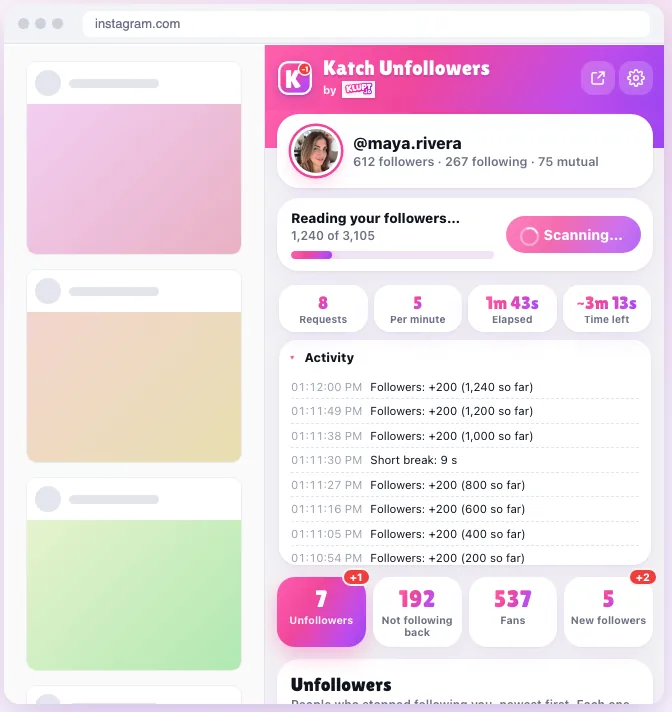
Watch the scan live, at a pace that protects your account
Katch Unfollowers opens in Chrome’s side panel right beside Instagram (or as a full page). You see the progress, requests, speed and time left. Pick Safe, Normal or Fast: each has hourly and daily limits shown in Settings, and the scan pauses on its own if Instagram asks it to slow down. It’s read-only: it never follows, unfollows, likes, comments or posts.
Set up in under a minute
- 1
Add Katch Unfollowers to Chrome
Open the Chrome Web Store page and click Add to Chrome. It is free and needs no sign-up.
- 2
Log in to instagram.com in Chrome
Use the Instagram account you want to check. The extension uses that session, so you never type your password into it.
- 3
Press "Scan my account"
Click the Katch Unfollowers icon and press Scan my account. "Not following back" is ready on the first scan.
- 4
See who unfollowed you
From the next scan on, the Unfollowers tab lists everyone who stopped following you, with the date it noticed. A daily check runs on its own while Instagram is open in Chrome.
Three ways to find your unfollowers
An extension, your own data export, or an unfollower app that wants your login.
| Feature | Katch Unfollowers Chrome extension | Data export checker klupt.io, any device | Password-login apps typical |
|---|---|---|---|
| Asks for your Instagram password | |||
| Who doesn’t follow you back | First scan | Free | Often paid |
| Who unfollowed you | Automatic, dated | Compare 2 exports | Often paywalled |
| Waits for Instagram’s data export | |||
| Double-checks before reporting | n/a | Rarely | |
| Works on a phone | |||
| Price | Free | Free (full unfollower list with Premium) | Often weekly subscriptions |
On a phone? The free Instagram unfollowers checker reads your own Instagram data export in the browser, with nothing uploaded.
How to see who unfollowed you on Instagram, safely
Updated · Sarah Mitchell
What an Instagram unfollowers extension can and can’t do
An unfollower tracker can only spot an unfollow by comparing your followers list at two moments, so every honest tool starts counting from its first scan. What it can show immediately is who doesn’t follow you back, because that only needs your current followers and following. Katch Unfollowers does both: the non-followers list on day one, then a dated unfollowers history from the next scan on. It only works for the account you’re logged in to; it can’t show who someone else unfollowed.
Is it safe for my Instagram account?
It reads only your own followers and following lists, the same pages Instagram loads when you scroll them yourself, with built-in hourly and daily limits and automatic pauses. It never takes actions on your account. Your lists stay in Chrome’s storage on your computer: nothing is sent to Klupt, and there are no analytics. The full details are in the Katch Unfollowers privacy policy.
An unfollow, a block or a deleted account?
When someone disappears from your followers, Instagram doesn’t say why. Katch Unfollowers checks each person: if they still follow you (Instagram sometimes skips people in a list), they never show up; if the account no longer opens for you, it’s labelled “Account gone”, which covers deactivated, deleted and blocking accounts. Here’s how to tell a block from an unfollow.
No computer? Use your data export
The extension needs Chrome on a computer. On a phone, request your followers and following from Instagram’s Accounts Center and drop the file into the Instagram unfollowers checker; it compares the lists in your browser. Our guides cover every way to see who unfollowed you and who doesn’t follow you back.
Want to know who they follow now?
Katch Unfollowers tracks your own followers. To see who another public account started following, newest first, use Klupt’s recently followed tracker, or the Katch the Ick extension, also by Klupt.
Frequently asked questions
Is there a Chrome extension to see who unfollowed me on Instagram?
Is Katch Unfollowers really free?
Does it need my Instagram password?
Can it show who unfollowed me before I installed it?
Will my Instagram account get banned?
Why does someone show as “Account gone” instead of “unfollowed”?
Where is my data stored?
Does it work on my phone?
Can I see who someone else unfollowed?
Find out who unfollowed you
Free forever. No password. Your data stays on your computer.
Not affiliated with Instagram or Meta. View on the Chrome Web Store